Hey fellow TKP'ers. Hope you're all enjoying your Memorial Day weekend! I know many of you are really up on computer technology (which i'm not - even though i spend all day drawing on one as an architect.) My daughter is graduating High School in a couple of weeks and will be going to college in the fall for Marketing/Business. The wife and I want to buy her a good desktop (PC not Mac) and monitor for her to use in college as a graduation present. (The school will be giving her a laptop to use for classes). She is also into gaming (almost exclusively minecraft right now). We don't want to 'build' a computer and would like to get something pretty much ready to go out of the box with the exception of having to install Office suite, Norton etc. We've usually had HP or Dells for ourselves. I'm assuming we will need to spend $1,000+ ?? Do you all have any suggestions a particular product we should look at, or on minimum hard drive, RAM, graphic card sizes, etc? Im assuming we should be looking for at least 1Tb drive and 16? 32? Gigs of ram?
Any thoughts you all might have will be greatly appreciated. Thanks in advance.

OT: Looking for Computer Advice
Forums:
DISCLAIMER: Forum topics may not have been written or edited by The Key Play staff.

Comments
For a generic PC that comes with tech support its hard to go wrong with the HP/Dells of the world. I would suggest either an Intel i5 (current gen) or Ryzen 5000 series (e.g. Ryzen 5 5600x) processor to start. 16GB of RAM should be sufficient but splurge for 32 if you can, and make sure its equipped with M.2 SSD (and not a SATA). If Minecraft is the extent of the gaming then the embedded graphics will be fine, but if there is an anticipation of more then I would look at something with and Nvidia or AMD graphics card integrated. For monitors - splurge for a 2K resolution if you can but unless there is serious gaming involved its going to be hard to not pick a good one (Acer, AOC, Asus, Dell, LG, Samsung all make great monitors). If she needs more mobility then everything i said still applies, but you will likely also want to pickup a docking station to go with it. I would highly recommend the Microsoft Surface Pro lineup - its a premium laptop, but well worth the $$$.
If you can stand a bezel then two 1k monitors are often cheaper than a 2k, also you get very little bezel monitors too. However, you probably will need more than an integrated graphics card for this just for the ports alone.
I dont keep up with these but Samsung used to make Dells monitors, often you could get equivalent Dells cheaper. So might look into that if true.
I haven't ever bought a prebuilt desktop, but the last time my dad did about a decade ago he bought a Dell and it came with so many proprietary connectors that it was very difficult to upgrade. The RAM was nonstandard, the PSU was a proprietary form factor, and I think even the motherboard layout was weird, so if it died you would have to replace it with another Dell motherboard or buy a whole new case, RAM, and PSU, at the very least.
Now it's entirely possible that they've changed their ways since then, but hearing about all of his complaints over the years convinced me that it's just not worth the effort.
Unless you find something at a significantly lower price from one of the main companies, I would first look for something from a place like ibuypower.com or another boutique PC shop.
More RAM is nice, but adding more is a super easy upgrade in the future if needed. If you get at least 16 you should be good.
For the GPU, look at https://www.videocardbenchmark.net/high_end_gpus.html to compare. Higher is better.
For storage, minimum 1TB. Some games these days are huge, so more storage might be useful if she ever wants to play those.
Pretty sure you mean 1 TB?
I would also suggest a smaller form factor case if you can find it. Search for pcs with either micro-atx or mini-atx cases. She probably won't have a lot of room in the dorm and she will be moving after a year. Also makes it easier to bring home on breaks if she wants.
Also, don't bother installing Norton on the computer, just use Microsoft defender which should be included with the Microsoft office package. Also microsoft office should also be included with her tuition or at least a trial included when you buy the computer, so unless she needs Microsoft office this summer, wait til she's in school to download it.
Office 365 is free for students, just have to have an active school email address, so may need to wait to get it.
Link
Not an expert, but here's a few thoughts that come to mind:
I wouldn't stress about the HDD size one way or the other. 1 TB hard drives are like $40 these days, so a big HDD shouldn't break the bank, but also, it's not that big of a deal to pick up an external drive later if she feels like she needs more storage.
I built a desktop 4 or 5 years ago primarily for photo editing, and it has 2TB of HD memory and a 250GB SDD. I like using the SDD as my C:/Drive for /Windows and /Program Files and such, and the HDD for pictures and miscellaneous file storage. This is nice because it makes the start up time *much* faster when I turn the computer on. Whether that's worth the extra money for an SDD, I can't say. But I like having it. You do have to be careful about where you're installing/saving stuff; if not, it is very possible to fill up a 250GB SDD.
The same desktop has 16GB of RAM. I have empty RAM slots I could use to add more, but I've never felt like I needed it. I don't think 16GB of RAM would be a bottleneck for anything a college student might be asked or want to do.
Why are you going for a PC in addition to the laptop? Is the latter not powerful enough to play games?
Most of your "ultra" laptops now only have an integrated GPU now and those have never been powerful enough to run games. I was just looking yesterday for a laptop to replace my aging 5 year old laptop and nothing outside of "gaming laptops" have a discrete GPU.
At the same time, those integrated GPUs should be plenty to run Minecraft. Also, dorm life isn't usually conducive of a desktop setup, unless she has a whole lot more space than I did my first two years. I would probably recommend holding off on the extravagant desktop purchase for now.
Gonna be a school issued deal (thats loaned, not hers.). Not sure what it's capabilities will be.
EDIT....meant to reply to Joe.
Intel nuc 12 extreme?
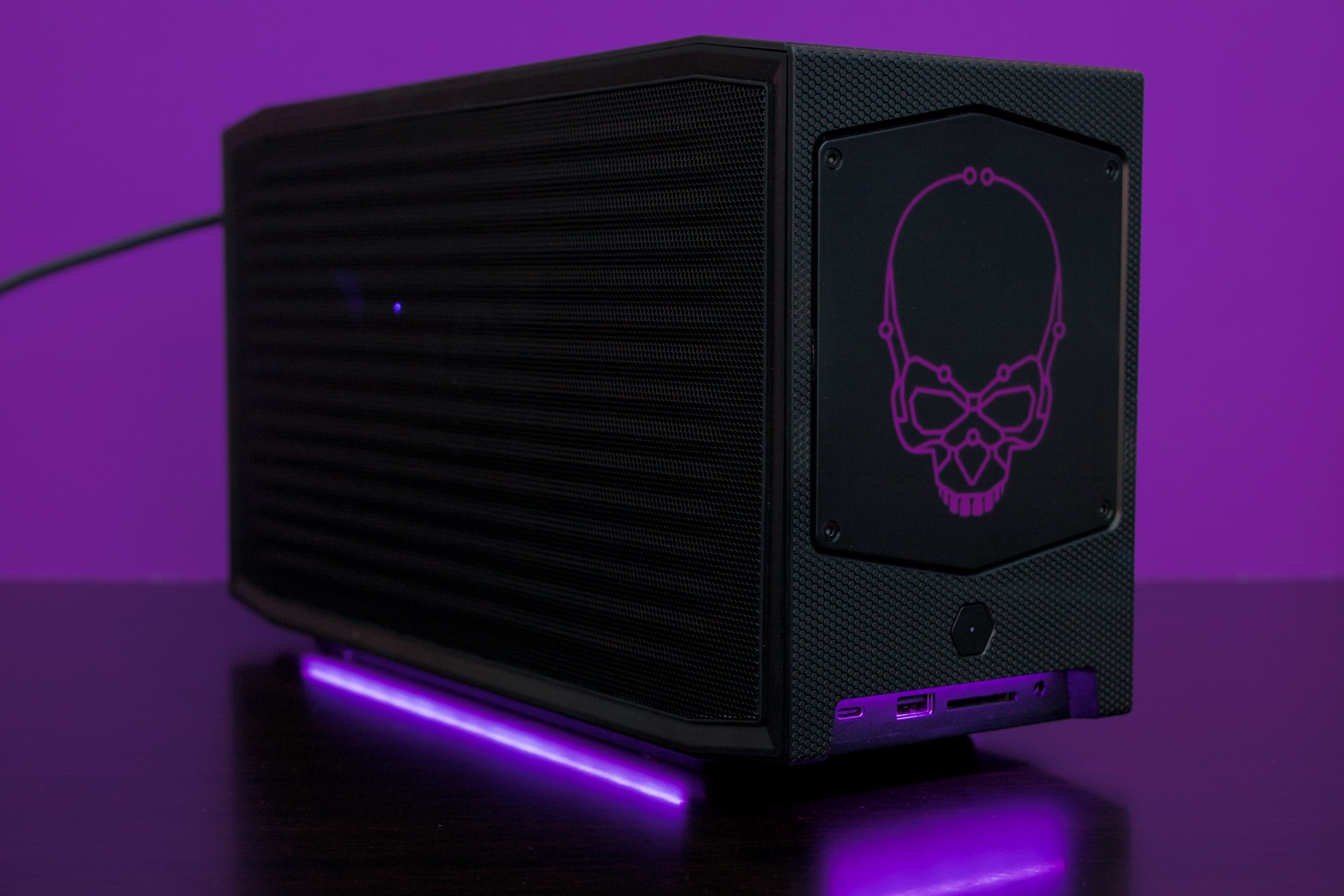
I dont know what that means...but my daughter would be sold on the skull and the purple for sure.
Thanks for the intel folks...its all very helpful.
Secondary question.....any reason to stay away from all-in-ones? Figure thats a way to save some space for a dorm room.
All in ones are a waste. You sacrifice everything for space savings. I tried to make a media PC out of one and it struggled with everything: streaming, DVDs, mp4s, lightweight games. It got a little better when I put in an external GPU but the processor still struggled. Ended up just building a full on desktop and hiding it in a closet instead of under the tv
Agree. These really limit the upgradability to almost nothing. If space is a major concern go with a really small form factor like the Intel NUC mentioned earlier (and there are many other less extreme versions that are lower cost and less space). There are also a few other manufacturers like Gigabyte, Asrock, and MSI (I think) that make these small form factor machines as well.
I preface this but saying I only have experience with laptops...
Her school probably has onedrive available to all students. If they do, your hard drive size shouldn't really matter over the course of the next 4 years. I'm not a gamer, but I see the younger students in my MBA and business analytics classes playing games on their laptops all the time.
Personally, I purchased an HP ENVY for around 2k two years ago. It has a dedicated gpu and I wouldn't consider it a gaming machine but it should be capable of playing most games from when I bought it ( you should be able to filter on any website for a GPU) I am extremely frustrated with mine as it constantly restarts on its own but I know some others who have a different version of the Envy without any problems. I'm actually probably purchasing a cheap laptop replacement in the next week to get me through the remaining classes I have to take.
The best investment I made was in purchasing an ultra wide monitor (30+ inch). Having multiple windows open in todays learning environment is huge. I wish I had one additional vertical monitor as well to view individual full page pdfs but at some point my wife will yell at me to stop buying stuff.
My personal recommendation to any parent would be to not invest in a gaming pc until after the first semester or year. Reward your kid with it once they prove they can get good grades. But that's just my take on it.
When I was at VT there was a program where you can buy new computers (PC & Mac) at discounted prices. I believe (don't quote me) you could also go to them for tech support
MacBooks only for me. I wouldn't be much help on this one I guess
I started out in engineering back in 95 (finished a ECON major) and they had recommended that we buy the PC, and they also recommended getting it with windows 3.2 because windows 95 was too "buggy" when it rolled out.
Well, what did the school do that year? They did a deal with Apple. All of the computers in the labs, math lab, all the classrooms that had them, were Macs. And at that time it near impossible to transfer work from one to the other, so the computer the school had me buy was basically useless. All that money to basically just play minesweeper and Doom II. Any work I need to do I had to go to a computer lab.
Hey man, windows 3.2 could play a wicked jazz jackrabbit, as long as you restarted with the right boot disk.

Wow, core memory unlocked!
curse you math emporium!!!!
Although I didn't have a choice - going in to the CS department we HAD to have a PC, and HAD to have Windows NT because of the compiler requirements and the crappy memory handling in Windows 95/98. But then we got hosed with all the Math work with all of that mathematica crap being entirely on Macs.
Started in Engineering in 96. The software package we had to purchase included Mathmatica. Never once stepped foot in the Math Emporium.
it wasn't an issue of the licenses... we had MANDATORY attendance time there.
Stupid math emporium. A bunch of us studied there late one night and missed the last BT run. Had to walk back to the dorms and cut through the golf course.
Nothing good ever seemed to happen at the Math Empo.
TBH, let her spend the first semester using the school issued laptop and then go from there. Dorm rooms aren't very large and a desktop takes up a decent amount of space in a room that small between the tower and the monitors. The school issued laptop may be enough to get the job done and that's $1-1.5k that you can use to buy her something else.